Audacity 4.0 arrives with dark mode and professional-grade editing tools
The free and open-source audio editor receives its largest update in years, introducing non-destructive workflows and a new interface while retaining the classic look for existing users.
The Muse Group has released Audacity 4.0, a significant overhaul of the popular free and open-source audio editor. Described as the largest update since Version 3.0, which generated considerable user debate more than five years ago, the new release aims to balance modern functionality with continuity for long-time users. The update introduces a fresh visual identity alongside expanded editing capabilities that bring the software closer to professional digital audio workstations.
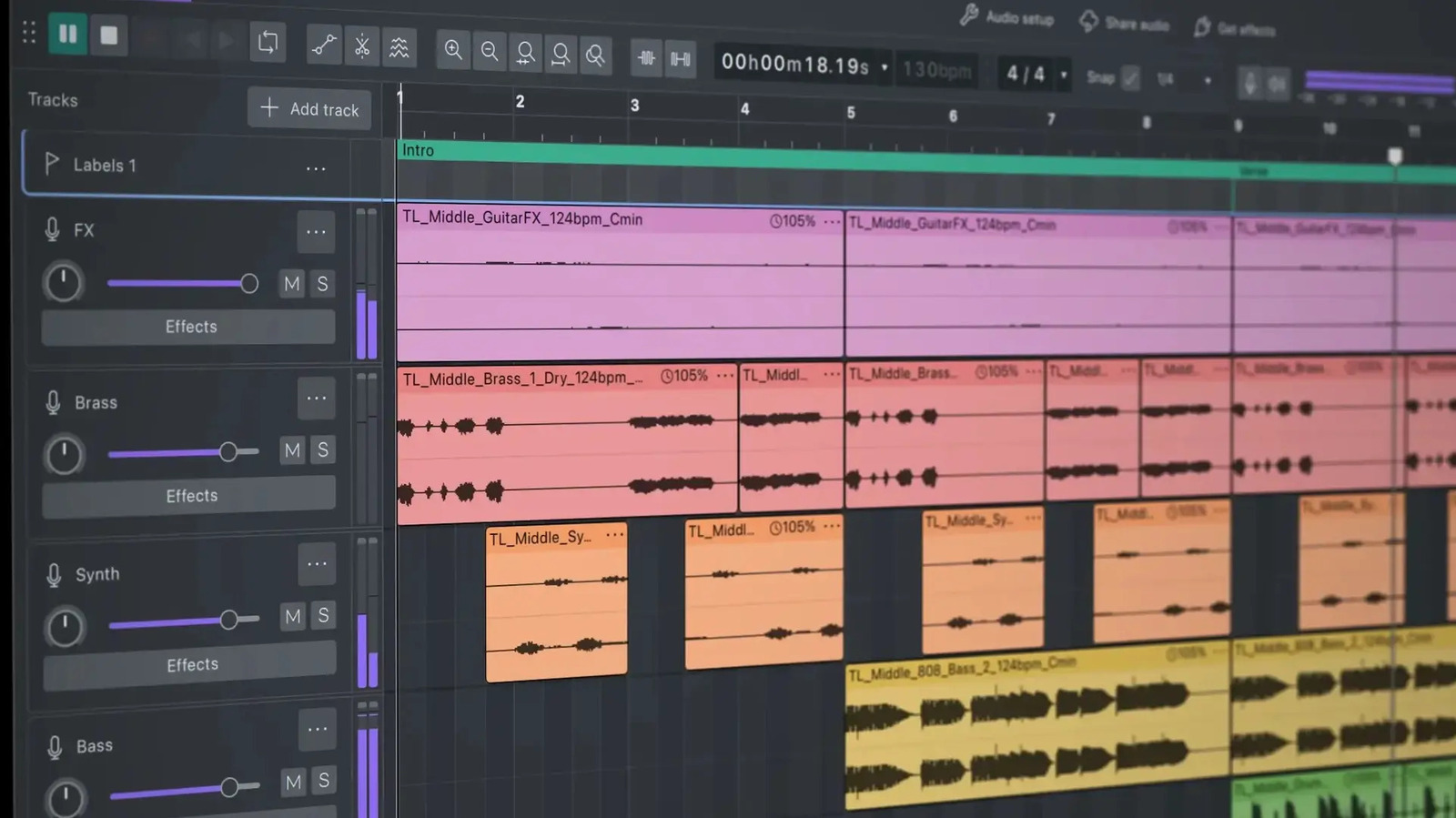
The most immediate change is the introduction of a new interface featuring a dark mode and vibrant accent colours. Audio clips are now displayed in colour, and UI elements such as gain sliders have been updated with a more playful design. However, developers have preserved the classic Audacity look as an option, allowing users to enable the traditional appearance during setup if they prefer not to adopt the new design.
Functionally, the update greatly expands non-destructive editing capabilities, a feature first explored in Version 3.2. Users can now overlap clips, and trimming back will reveal the covered-over audio if adjustments are made too far. Multiple clips can be selected and trimmed simultaneously by dragging a single handle, and they can be grouped for complex edits. A new splitting tool also allows for one-click clip cutting, a capability familiar to users of other creative software.
A new envelope tool enables users to create draggable control points for parameters such as gain. Waveforms visualise these changes in real-time, allowing users to see if a portion of a clip is redlining. Additionally, users can now edit audio down to the sample level by zooming in on a clip, a powerful feature for making fine micro-adjustments. Each track now includes an accompanying meter to help identify which tracks are clipping the mix.
One of the most controversial changes is likely to be the removal of the "sync-lock" feature, which previously ensured that multiple clips could be edited in tandem. To mitigate potential backlash, new keyboard shortcuts have been added to replicate this functionality. Plugin support has also been made more robust in this release.
While the editing changes may feel familiar to users of fully-featured digital audio workstations like Ableton Live or ProTools, the value proposition remains distinct. Most of those professional programs cost hundreds of dollars or more, whereas Audacity remains free. The Muse Group has provided deeper dives into the changes on the Audacity 4 webpage and in an accompanying video.