Googlebook keyboards bring Android’s classic navigation keys to the desktop
The Verge reports that triangle, circle and square keys provide Back, Home and app switching, with potential use for Android apps that are awkward to control by mouse.
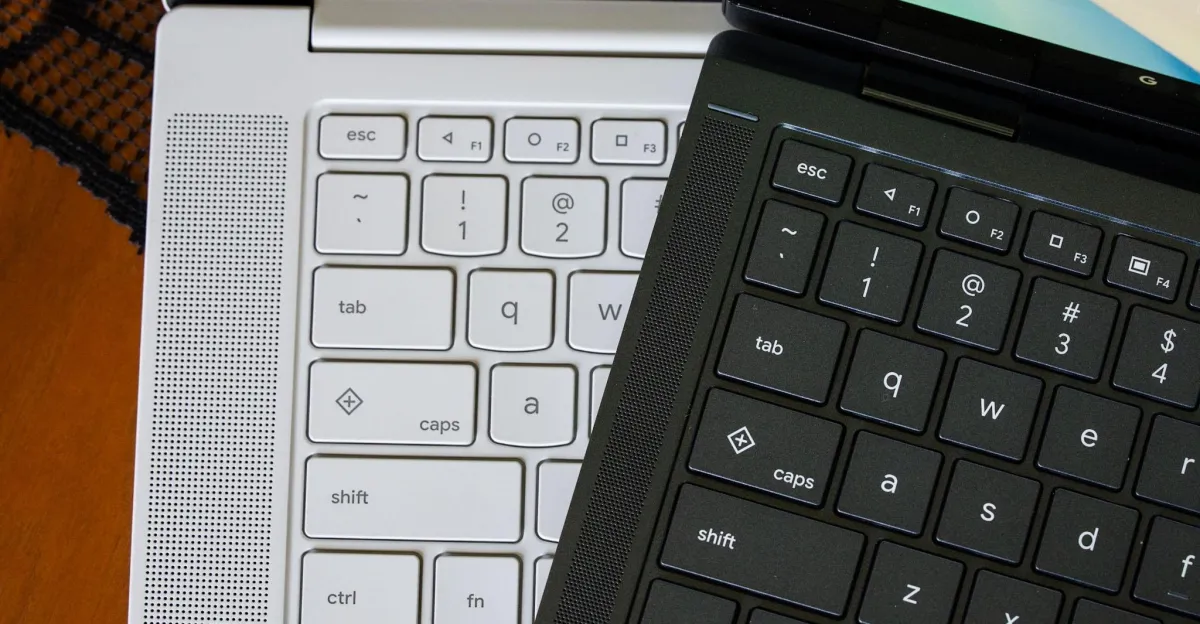
Googlebook keyboards include physical keys for Android’s familiar Back, Home and app-switcher functions, according to The Verge. The keys sit at F1, F2 and F3 and display the triangle, circle and square icons used in Android 5.0 Lollipop.
The left-pointing triangle goes back. The circle minimises open apps to return to the home screen, while the square shows open apps in a view the article compares with Mission Control on macOS or Task View on Windows.
The Verge says the Back key can be useful with Android apps that are not well adapted to desktop interfaces or mouse controls. It describes the layout as standard across Googlebooks, though the report does not provide model-by-model detail.
The icons date to Android’s navigation buttons before gesture controls became common. The Verge also notes that Quick Insert and Google logo keys appeared on some Chromebooks a couple of years earlier.